Labels

.

Blogger News

Also On >> WordPress!

Internet Ensures Disabled Vet Never Has To Worry About Putting Food On The Table Again

Disabled Vet Gets Life-Changing Thank You!


Earlier this month, a struggling Gulf War veteran with disabilities had to decide whether to give up his home or feed his family. Now, thanks to the Internet, this former serviceman won’t ever have to make that impossible choice.

But the happy ending for this story actually started with the kindness of another vet who had fallen on hard times.

Last month, Las Vegas magician Rob Anderson pulled off one of his greatest tricks.
He made piles of money pour out from homeless veteran Alan McKracken’s cardboard sign. Anderson then inspired the Internet to donate money too and eventually collected more than $40,000.
But McKracken only accepted the money he needed and asked that the rest be given to another veteran in need.

That’s when Anderson visited Gulf War veteran Johnny Hicks who said he was recently fired from his government job after taking time off to get surgery for a disability he incurred while serving.
Since then, money has been tight for the family of six, especially after they recently lost much of their furniture and clothes to a mold issue.

“I want to be able to do good things for people,” said Hicks who served in the Navy for 20 years. “I’m just struggling right now.”

The family subsists on $1,200 a month from his military retirement, which isn’t enough to cover their food and rent costs.

But with help from complete strangers, Anderson had enough funds to pay those bills, and a little leftover for some extra frills.

"You deserve it -- for your service to the country, for allowing me to live the life I want to live,” Anderson told the shocked veteran. “You provided that for me and a lot of other people.”
Watch the video above to see this deserving and grateful veteran get a boost so he can get back on his feet.

MTV News Piece on WALK OFF THE EARTH

The Truth Behind the ALS Ice Bucket Challenge

Is it “Government vs. the people” or is it “Government for the people?”

Make Money on Blogger with Google AdSense

Three years later, Facebook is bringing back its F8 developer conference to San Francisco on April 30

A view of Facebook's logo May 10, 2012 i
At SXSW today, Parse co-founder and CEO Ilya Sukhar announced Facebook’s F8 conference will be held this year on April 30 at the San Francisco Design Concourse. That the announcement comes from Sukhar is fitting because Facebook, Instagram, as well as Parse engineers and product team members will be available throughout the conference to provide 1:1 help and advice.
The conference will be a little different this year: it will be squarely aimed at developers eager to learn how to best use Facebook, Instagram, and Parse to build, grow, and monetize their apps. The company is promising a full day of technical sessions and hands-on labs, open to more than 1,500 mobile and Web developers from all over the world.
By having a pure developer conference, Facebook says it is “going back to its roots.” The first F8 event, held in May 2007, introduced developers to the social graph. In July 2008, Facebook showed off Facebook Connect for websites, but also introduced a new profile design. In April 2010, Facebook unveiled social plugins (including the Like button), the Open Graph Protocol, Graph API, and OAuth 2.0 support. In September 2011, Facebook introduced the Timeline profile and a broader version of its Open Graph.
In 2012 and 2013, Facebook chose not to host F8 in favor of multiple smaller events. Now, three years later, the company looks eager to build on its Parse acquisition. If we are to believe the message going out today, there won’t be much user-focused news at F8. That being said, if Facebook has decided to bring back its only major conference, chances are it has something notable to share.
F8 2014 will open with a morning keynote, followed by four tracks that cover getting started guides, technical best practices, infrastructure strategies, engineering deep dives, and advertising tips for apps and games. Facebook says it will also have sessions dedicated to open source technologies.
Facebook will start accepting applications for the event “soon.”

Ranking Your Channel With Channel Keywords

Night Photography Tips

Star Trails Photography Tutorial: Take Pictures at Night

Hope House Cebu (Documentary)

News, Media And Truth

DIY Network Video - Make Videos Like The Pros

Here Are The Tools:

How It Works:
.
  • Use One True Media to add special effects and create clips to add into your video. 
  • Use Real Player to grab videos off of the web and download them free.
  • Use Movie Maker or iMovie to join/merge clips together and to insert audio into the video
Over the past few years I have been networking and finding new and clever ways to create things without paying any money out.  I have been getting more and more into the film industry and have been promoting different causes through the power of media.

Every now and then, I do invest in certain equipments such as: Computers, Microphones, Cameras etc. However, I have not spent anything on editing software.  


Working With The Free Tools:


  • # Movie Creation Tip 1. 
To start, lets look into movie creation.  To create animations, make a scene on Wix.com under Adobe Flash Sites. After you have created a scene, capture it using YouCam.  If you own Windows 7, it should come on your computer for free but if you own Windows 8, you will need the YouCam 5 version and that will run $34.95 on the download section.  If your webcam software has what it needs, then go ahead and capture your scene using desktop capture.


Example:


  • # Movie Creation Tip 2. 
Here is one more way to create a skit to insert into your video...Use One True Media to make images come alive, add effects and video transitions.

It costs to download what you create, but I know how to get around it.  Once you have created a video,  go to preview then let RealPlayer grab the video and download it.

Example:

For best uses, use the RealPlayer Browser.


  • # Movie Creation Tip 3. 
Now let's look into making the edits, plus some tips on the making of a film.

Filming: All videos, movies and short films are all based on a script.  When filming, you must either remember it or have it where you can see it but it must not be in view of the camera.

It does not look professional to have someone holding a piece of paper and reading in off in front of the camera.   

There are three basic types of film: 


  • Movies. Where you tell a story through acting and plays.

  • News Media. It is a practice journalism, both big companies and independent go on air, either on TV or online podcast giving insight to a certain topic.

  • Documentary. Documentary films constitute a broad category of nonfictional motion pictures intended to document some aspect of reality, primarily for the purposes of instruction or maintaining a historical record.


Editing the cuts:  This is your final step in getting your video ready for uploading.  You can use a mixture of scenes, both ones you have filmed and ones you have downloaded from the internet.  

I have found that I don't even have to be in the area of the story to cover it.   All I have to do is gather information from the person via messaging, then collect his or her's videos to make the project.  Then look around YouTube for additional  video clips.  

In my video Featured Causes & Community, I used three different videos to make the scene.
The first clip, the U.S. Money Factory Scene.  The seconded, Mall Shoppers Scene.  Then the third scene, a City Theme all to help give the message. 


Helpful Video Tutorials

Multimedia Tips 2013:   http://bwp-promotions.blogspot.com/2013/02/multimedia-tips-2013.html


  • # Movie Creation Tip 4. 

Remember to save your downloads for later.


  • Organize your projects into folders.


  • Then make a system so that you can keep organized.


Ok, once you have a system, you are then ready to keep on producing videos independently.
One thing I have learned is that you have to jump in.  I did not know everything at first and I am still learning.
Every video that I do always has come out looking better than the last.  All of these skills come with practice.

I hope that these tips can be of help to all of you newbies out there.  Please free free to ask questions or add some of your advice in the comments below.


Feed

Inspired Media is very very pleased to Launch an Indigogo Campaign! Help us produce this project that will impact girls in Northwest Arkansas. Every bit helps!

http://www.indiegogo.com/projects/beloved/x/3109468?show_todos=true
 — with Laura Wohlford in Fayetteville.

How Content ID works


Copyright holders use Content ID to easily identify and manage their content on YouTube. Videos uploaded to YouTube are scanned against a database of files that have been submitted to us by content owners. When Content ID identifies a match between your video and a file in this database, it applies the policy chosen by the content owner. Content owners may choose the following policies:
Monetize: If ads that you did not enable appear on or before your video, the content owner has applied a Monetize policy.
Block: If the content owner has chosen a Block policy, your video will either not be viewable on YouTube, or its audio will be muted. The owner may choose to allow content within your video to play in some countries while blocking it in others. While you may not be able to see your video, or hear its audio, people in other regions may still be able to view and interact with it as usual. You will still be able to view, moderate, and respond to comments on the video from the Comments page in My Messages.
Track: If the content owner has chosen a Track policy, your video will be unaffected. However, its viewership statistics will appear in the content owner's YouTube Analyticsaccount.
Please keep in mind that any of these policies can be country-specific. A video may be monetized in one country, and blocked or tracked in another.

How to check your Content ID matches

You can view all of your Content ID matches in the Copyright Notices section of your account. If your video has been blocked worldwide, your account standing will be negatively affected and you may lose access to certain features.
If you believe the Content ID match to your video is correct, you may simply acknowledge it and move on. However, if you believe the system has misidentified your video, you may dispute the match.
If your video has been claimed by “one or more music publishing rights collecting societies,” you may want to learn more about collective rights management.

How can I use Content ID?

Only certain content owners will qualify for access to Content ID. If you don't own exclusive rights to a substantial body of content that is frequently uploaded by the YouTube user community, Content ID is probably not right for you. However, if you believe your content meets this criteria, you may apply.

Everything you want to know about LinkedIn – Facts & Figures 2013


Last week LinkedIn announced officially that they have over 200 million members worldwide. But what are the trends? How often is this online network really visited? By whom? And how many companies use this site? LinkedIn Global Stats 2013 Let’s have a deep dive again in the global LinkedIn statistics...
Last week LinkedIn announced officially that they have over 200 million members worldwide. But what are the trends? How often is this online network really visited? By whom? And how many companies use this site?

LinkedIn Global Stats 2013

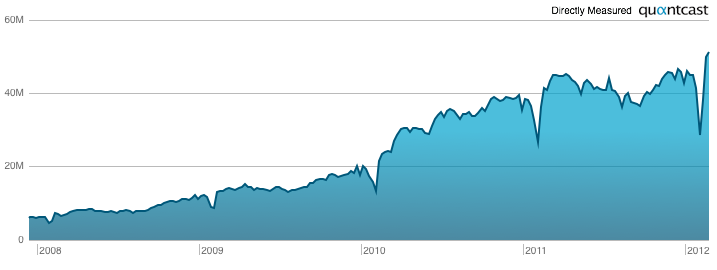
Let’s have a deep dive again in the global LinkedIn statistics (previous edition LinkedIn facts & figures 2010). LinkedIn.com is visited by more than 50 million unique visitors each week via the web. They’ve viewed 2.6 Billion pages in the past month (Traffic for Dec 20, 2012 – Jan 18, 2013). Some of its users are very active, 1% of the addicts are responsible for 26% of all traffic! The average user spends 7 minutes and 22 seconds on the website.
LinkedIn Unique Visitors 2013 per week

Picture: Number of people who visit LinkedIn.com each week with a browser (Global).
Notes: These web statistics only includes visits via the web (mobile and fixed). Visits through the LinkedIn mobile app are NOT measured. The dip in the summer and Christmas period is typical Internet usage during holiday periods.

LinkedIn.com’s Regional Traffic Ranks

LinkedIn.com is a popular website globally. In the following countries its in the top 10 of most visited websites (number represents ranking):
  1. Netherlands 5
  2. Israel 6
  3. United Arab Emirates 7
  4. Ireland 7
  5. Denmark 7
  6. Pakistan 8
  7. India 8
  8. Belgium 8
  9. Singapore 9
  10. Switzerland 9
  11. South Africa 9
  12. Australia 9
  13. Spain 10
  14. Canada 10

LinkedIn Members

  • Since 9 January 200 LinkedIn has 200 million members worldwide.
  • The network is growing by two members per second or 10-15 million members per quarter.
  • Average income is 86.000 US$ per year.
  • 25% of all employee profiles views are from co-workers.
  • Three out of four users wants to be approached for other job opportunities.
  • People visit LinkedIn.com more by computers at home (66%) than computers at work (34%).
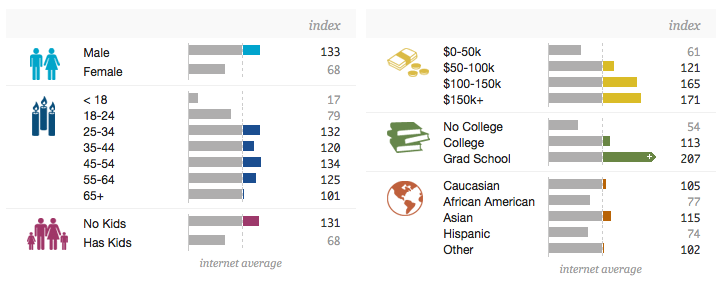
Demographic profile:
LinkedIn Audience 2013

LinkedIn Groups

There are 14.366 Recruitment related groups. These are the top 5 groups:
1) The Recruiter Network
Not moderated, open group
Very Active: 6,210 discussions this month · 405,229 members
2) The Recruitment Network
Not moderated, closed group
Very Active: 5,594 discussions this month · 234,159 members
3) Dubai Recruitment
Not moderated, closed group
Very Active: 1,027 discussions this month · 232,097 members
4) Recruitment Consultants and Staffing Professionals
Moderated (!), closed group
Very Active: 128 discussions this month · 120,689 members
5) E-Recruitment
Not moderated, closed group
Very Active: 3,270 discussions this month · 105,612 members

LinkedIn, The Company

  • LinkedIn’s mission is to connect the world’s professionals to make them more productive and successful.
  • LinkedIn has 3,177 employees (September 2012).
  • Headquartered in Mountain View, Calif., LinkedIn also has U.S. offices in Chicago, Los Angeles, New York, Omaha and San Francisco. International LinkedIn offices are located in Amsterdam, Bangalore, Delhi, Dublin, Hong Kong, London, Madrid, Melbourne, Milan, Mumbai, Munich, Paris, Perth, São Paulo, Singapore, Stockholm, Sydney, Tokyo and Toronto.
  • Revenue for the third quarter in 2012 was $252.0 million, an increase of 81% compared to $139.5 million in the third quarter of 2011.
  • On 24 February 2012, LinkedIn announced the acquisition of the start-up Rapportive, a browser plug-in that makes contact information available which is acquired from social networks like Twitter, Facebook and Google’s Gmail. LinkedIn has not yet indicated how they are going to use the Rapportive technology.
  • On 3 May 3 2012, they bought Slideshare for U.S. $ 119 million. At that time SlideShare attracted 29 million visitors per month. It was stated that the purchase is made for LinkedIn members to provide a way to discover people through content. Starting last week (!) you can link your LinkedIn and Slideshare account together.

More facts & figures about LinkedIn.com 2013

  • At present, over 2.8 million businesses have a LinkedIn Company Page.
  • The website is available in 19 languages: Bahasa Indonesia, Bahasa Malaysia, Čeština, Dansk, Deutsch, English, Español, Français, 한국어, Italiano, Dutch, 日本语, Norsk, Polski, Português, Română, Русский, Svenska, Türkçe.
  • The application LinkedIn Events ended on 26 November 2012. Shortly afterwards all users received a message that the LinkedIn profile will get a visual makeover.
  • LinkedIn Answers, the Q&A forum, will end on 31 January 2013.
All new products and enhancements in 2012 are summarized in the following presentation, which is available on SlideShare (of course):


Our event for the End It movement is tonight. There are currently more slaves in the world than there have ever been throughout all of history, and that is not okay.

We've gathered bands from all over the state, and we're sticking out 27 hours of straight prayer and worship to represent the 27 million men women and children who are currently enslaved. People can come and go as they please.

The event starts tonight at 5:30 and ends at 9:30 on Friday (MDT time zone)

Since you can't make it in person the event will be broadcast all over the world, so please join us in lifting up this issue at http://endit.churchonline.org/ or www.enditmovementslc.com

Multimedia Tips 2013

As Requested:  In today's How To Article, we will explore Movie Making. 

There are two platforms for this type of project...

1. Windows - Windows Live Movie Maker
2. Mac - iMovie

#1. Using Windows Live Movie Maker...

(1.) How To Use Movie Maker...


(2.) Editing With Movie Maker...


Older Version: Learn How to Apply Cloning, Split Screen, and Picture-in-Picture Effects 

Read More:  http://youtube-answers.blogspot.com/search/label/Video%20Creation

(3.) Content...

                    After Effects Tutorial, Click Here                                       

  How To: Make A Professional Intro in Windows    


#2. Using iMovie...

(1.) Creating Videos Is Very Easy With iMovie...


(2.) Creating a Project Via iMovie...


(3.) Visit Them On YouTube For More...

iMovieFAQ

 iMovie FAQ    @YouTube.com


#3. Tips For Filming & Producing...

(1.) High Speed Photography Techniques...

(2.) Behind the Scenes Example...


(3.) Green Screen Effects...


Multimedia Guide...

Making a name for yourself as an Internet Sensation...


I don't think there is a single answer for this question...  But my observations are:
  • Be yourself
  • Create a video about something that is really popular and make it memorable
  • Promote yourself by building your friend base/subscriber base
You never know when something will become viral.

How do I promote myself on YouTube?

There are many questions asking how you can get more views or more comments?

The answer to both these questions is promotion. You have to increase your friend base which will naturally increase your views and comments.

Here are some things you can try:

  • Add many keywords that describe your video to make it easier for people to find when searching...  include synonyms to the keywords that you selected...
  • Check out some videos with a similar topic to your video... Perhaps you can create a video response to their videos... it will help generate some traffic to your videos and perhaps increase your subscriber base.

  • Make sure you do not disable your EMBED code... If people like your video enough, this will allow them to post your video on their web pages or in email, thus generating views.

  • You can also try a new software tool that can assist in your promotion needs...

    TubeBlasterPro

Tools...

Online Video Tools:

OneTrueMedia.com

Promotions & Management Tools:  

BrandonWPrather.WordPress.com/NeworkersGuide

Filming Tools: 

>>Top 5 Free Screen Recording Softwares For Windows

Video Tools: 

>>Top 5 Free Video Editing Software For Windows

>>18 Best Video Editing Software For Free Download (Windows)

Audio Tools: 

>>Free Audio Converter - CNET Download.com

>>Audacity: Free Audio Editor and Recorder


Plug-ins and Libraries @Audacity.SourceForge.net


Links...

BWP Tech Blog @ BWP-Tech.Blogspot.com

Videos Animations: http://youtu.be/NzUQ3LjCJ5g, http://youtu.be/DBp4Kr9tIq0, http://youtu.be/GCwHki1q_I8, http://youtu.be/B9IzgIpaDFw, http://www.youtube.com/watch?v=YbsaEz0tdCM & http://youtu.be/S8dGqL1fKR8


Comments / Your Posts

Featured

Live Feed

Visitors

View My Stats

HQ